
Приложение
Как установить приложение на iOS
Смотрите видео ниже, чтобы узнать, как установить наш сайт в качестве веб-приложения на домашнем экране.
Примечание: Эта возможность может быть недоступна в некоторых браузерах.
Вы используете устаревший браузер. Этот и другие сайты могут отображаться в нём некорректно.
Вам необходимо обновить браузер или попробовать использовать другой.
Вам необходимо обновить браузер или попробовать использовать другой.

PrivWindoze (Private Windows) 2026-03-30
- Автор furtivex
- Дата создания
v5.8.9 (01.17.2026)
- Database update: MSI LiveUpdate, MSI VoiceControl
- Process whitelist updated: HitmanPro Alert
v5.8.8 (01.11.2026)
- Database update: AsusSurvey
v5.8.7 (12.21.2025)
- Bug fix: Typos in Policies scan. Incorrect output was sent to log.
v5.8.6 (12.21.2025)
- Packages update: Windows CoPilot MSIX Pack
v5.8.5 (12.16.2025)
- Database update - Notepad and Paint AI
- Optimized Stage 1 - Processes scan
v5.8.4 (12.02.2025)
- AV detection updated: SpyHunter
- Database update - HP bloat
v5.8.3 (11.22.2025)
- Database update - Acer bloat

PrivWindoze Changelog
=====================
v5.8.3 (11.22.2025)
- Database update - Acer bloat
v5.8.2 (11.08.2025)
- Database update - MSI bloat
- Bug fix which resulted in an inaccurate report on Windows 10 systems. The report mentioned certain files were deleted, but they weren't. Reworked to match that of how DoesNotBelong handles that specific directory.
v5.8.0 (10.17.2025)
- AV detection updated + Sophos Enterprise
- Database update - Lenovo Ready For Assistant
v5.7.9 (10.13.2025)
- Database update - Intel Telemetry
v5.7.8 (10.07.2025)
- Major bug fix: The tool was closing at stage 1. This should now be fixed. Tested on Win10 x64
- Database updated - Samsung bloatware, Office 16 AI
v5.7.7 (10.05.2025)
- Improved Stage 1 - Process killing. Any console errors should now be gone. Tested on Windows 10 and 11 x64
- On newer systems without WMIC.exe, powershell.exe is now able to terminate suspicious processes impersonating legitimate files, even if they include encoded UTF8 - UTF16 filepaths. This should alleviate all previous 'binary file matches' found in logs
- Fixed a error where scanning for the user's antivirus was done twice (The AV scanner runs twice · Issue #1 · furtivex/PrivWindoze-Issues). This now only occurs once
v5.7.6 (10.04.2025)
- Added Donation Link line to footer of log. Donating helps me stay enthusiastic and motivated to continue finding improvements to the program
v5.7.5 (10.04.2025)
- Improved Stage 1 - Process killing
- Removed detections that would show up in nearly every log due to being protected by the OS. e.g. DiagTrack folder
- Reworded English console output to be more concise and clean. Other languages to follow suit soon
- Removed detection of Tobii Eye Tracking software
- Added a link for reporting bugs via Github to the log header
- Reworked the way AppxPackages are scanned, to match that of DoesNotBelong utility
- Updated database
- The tool now also turns off all forms of sleep and hibernation. This is denoted within the miscellaneous section of the log file
v5.7.2 (10.03.2025)
- Disable Widgets on Taskbar
- Task whitelist updated: .NET Framework Arm64
- Updated resource icon
v5.7.1 (09.20.2025)
- Task whitelist updated. Primarily focused on Microsoft Intune
- Microsoft Office Telemetry component added for detection: msoia.exe
PrivWindoze recently received some significant updates.
- Process whitelist updated
- Compatability update. Now only Windows 10 and 11 64-bit systems are supported.
- Database updated - New Microsoft Edge Package detail
- Reworked Task scheduler scan. It should now support all languages. Please advise if that is not the case
- Reworked Process scan. This probably isn't needed, but it is now a copy from the DNB tool
- Polished log output to match that of DNB
v5.5.1 available
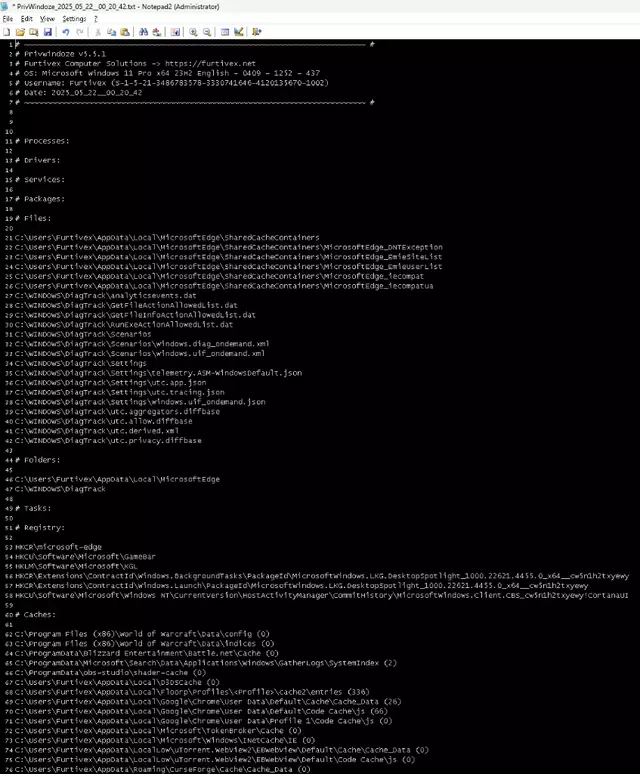
- New # Cachessection of log file
- Previous file and folder caches are now consolidated into a new section of the log labeled # Caches with their respective amounts listed to the right
- More verbose File logging.
- For example: If a folder gets deleted, PrivWindoze will try to list its contents into the # Files subsection of the log.
Версия 5.5.1 доступна
- Новый раздел # Caches в лог-файле
- Ранее разрозненные данные о кэше файлов и папок теперь объединены в новый раздел лога под названием # Caches, где справа отображается соответствующий объём.
- Более подробное логирование файлов
- Например, если папка будет удалена, PrivWindoze попытается вывести её содержимое в подразделе # Files лог-файла.
Вложения
The tool received a large update including several improvements in the past 24-48 hours.
- Improved script flow for efficiency
- Policies modified are now output in the log's Registry section (was hidden)
- Added Sony VAIO preinstalled programs to database
- There is now transparency on what the script is currently doing. Example:
- To do: Update all translations (20) for the same effect
- Added BitDefender to process whitelist
Инструмент получил крупное обновление за последние 24–48 часов, включая ряд улучшений:
- Улучшена структура выполнения скрипта для повышения эффективности
- Изменения политик теперь отображаются в разделе Registry лог-файла (ранее были скрыты)
- В базу данных добавлены предустановленные программы Sony VAIO
- Добавлена прозрачность текущих операций скрипта. Пример:
To do: обновить все переводы (20), чтобы добиться того же эффекта- BitDefender добавлен в белый список процессов

The full version no longer removes Edge WebView 2 & Microsoft Teams
Lite version not affected as it never removed those two programs
- Brave Cache 3 Profiles
- Aggressive Task Scheduler and RunOnce cleaning
- Bug fixes
- Definitions Updates